PICTURE SHORTLIST / FREE DESKTOP TOOL
See every picture.
Keep the best few.
Make a labelled picture contact sheet with ImageMagick, then return to the same originals and create a smaller shortlist. Keep the recipe as well as the finished PNG.
This is a Linux terminal exercise. It needs an existing ImageMagick 7 installation and the DejaVu Sans font at the path shown in the commands. Tested on Linux with ImageMagick 7.1.1-43, using the twelve fictional practice pictures below. No installation is included.
For a point-and-click alternative, Adobe Bridge is also free and has a PDF contact-sheet workflow. That route is documentation-reviewed, not tested here. You do not need a Photoshop subscription for either of these small jobs.
Download the complete practice folder Keep the text instructions
The ZIP contains twelve synthetic PNGs, two readable shell commands, these instructions and file hashes. It contains no ImageMagick binary, font or installer. This is a static download, not a tool that opens your ZIPs or uploads your pictures.
1. Make a sheet of all twelve pictures.
- Extract the download into a new folder. Keep its inputs folder beside make-proof-v1.sh and make-proof-v2.sh.
- Open make-proof-v1.sh as text and read it before running it. It uses a specific local font path and explicitly lists the twelve pictures.
- In that folder, run
sh make-proof-v1.sh. If ImageMagick or the font is unavailable, stop and follow your operating system's supported setup route. This guide does not install anything. - Open proof-v1-direct.png in your usual image viewer. Check twelve pictures in three columns, numbered 01 through 12, with readable filenames and original pixel dimensions. Inspect the last row too.
The command reads the originals and creates smaller previews without changing their aspect ratio. The PNG is a flattened picture, not a backup of the originals or a layered document.
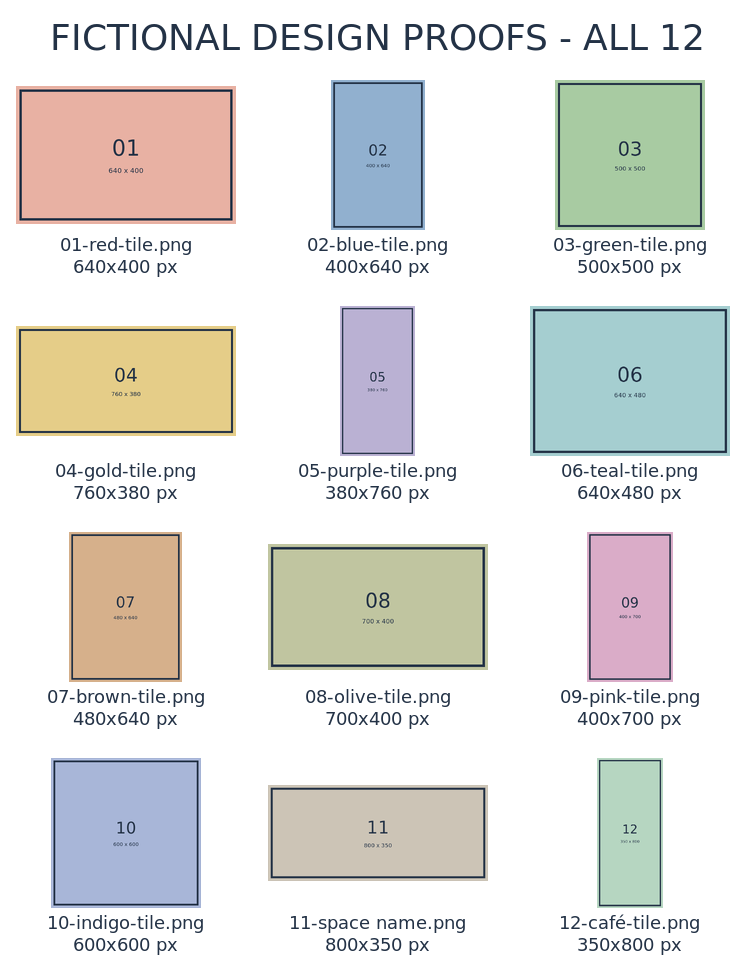
Read the exact first command
#!/bin/sh
# Writes a new PNG using the adjacent synthetic inputs. Requires ImageMagick 7.
set -eu
cd "$(dirname "$0")"
if [ -e proof-v1-direct.png ]; then echo "Output already exists; choose a new name instead of overwriting." >&2; exit 2; fi
magick montage -font /usr/share/fonts/truetype/dejavu/DejaVuSans.ttf -pointsize 18 -fill '#233246' -background white -label '%f
%wx%h px' ./inputs/01-red-tile.png ./inputs/02-blue-tile.png ./inputs/03-green-tile.png ./inputs/04-gold-tile.png ./inputs/05-purple-tile.png ./inputs/06-teal-tile.png ./inputs/07-brown-tile.png ./inputs/08-olive-tile.png ./inputs/09-pink-tile.png ./inputs/10-indigo-tile.png './inputs/11-space name.png' './inputs/12-café-tile.png' -geometry '220x150>+16+12' -tile 3x -title 'FICTIONAL DESIGN PROOFS - ALL 12' -strip proof-v1-direct.png
Output already exists? The script's ordinary existence check refuses to overwrite it. Make a new copy of the script and change the output filename in both the check and the final command. Preserve your good copy. Do not run two copies simultaneously: this check is not a concurrency or security guarantee.
2. Keep a way back, not just the preview.
Keep the inputs folder + saved command + output PNG together. Close the PNG and reopen it. Check the pictures and labels again before relying on it.
To reproduce the sheet, duplicate the saved command and choose a fresh output filename in both places. Run that copy against the same originals. Our repeated command produced the same decoded pixels in the same installed environment; exact results on another machine or with another font are not established.
If you move the folder, keep the relative inputs paths intact. ImageMagick and the selected font must still be available. A copied folder worked in the same Linux environment. This is manual file keeping, with no automatic saving or sync.
3. Return and make an eight-picture shortlist.
- Leave the first PNG and all twelve original inputs unchanged.
- Read make-proof-v2.sh, then run
sh make-proof-v2.shin the same folder. - Open proof-v2-direct.png. Check two columns and this eight-picture order: 12, 11, 09, 07, 05, 03, 02, 01.
- Keep both versions, their two commands and the originals. You can change the selection again without extracting pictures from a flattened contact sheet.
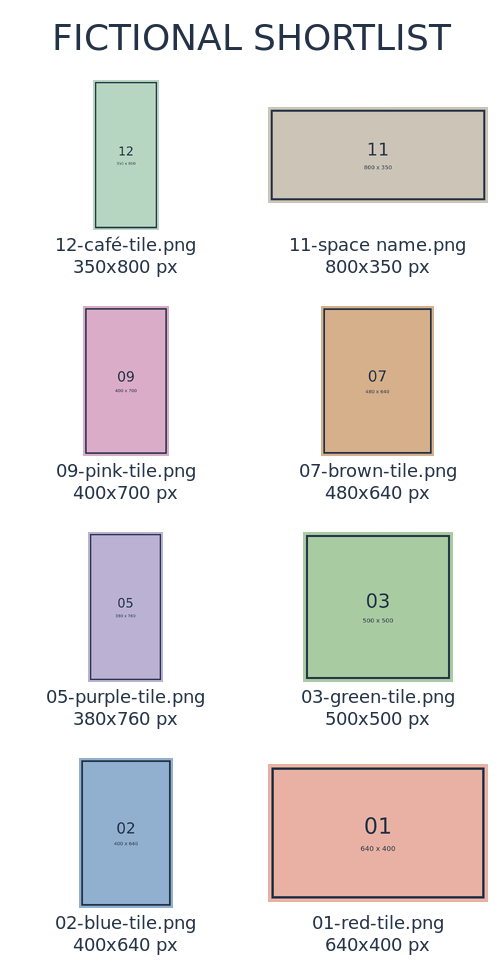
Read the exact revised command
#!/bin/sh
# Writes a new PNG using the adjacent synthetic inputs. Requires ImageMagick 7.
set -eu
cd "$(dirname "$0")"
if [ -e proof-v2-direct.png ]; then echo "Output already exists; choose a new name instead of overwriting." >&2; exit 2; fi
magick montage -font /usr/share/fonts/truetype/dejavu/DejaVuSans.ttf -pointsize 18 -fill '#233246' -background white -label '%f
%wx%h px' './inputs/12-café-tile.png' './inputs/11-space name.png' ./inputs/09-pink-tile.png ./inputs/07-brown-tile.png ./inputs/05-purple-tile.png ./inputs/03-green-tile.png ./inputs/02-blue-tile.png ./inputs/01-red-tile.png -geometry '220x150>+16+12' -tile 2x -title 'FICTIONAL SHORTLIST' -strip proof-v2-direct.png
For your own work, copy a command and replace only the explicitly listed input paths with copies of pictures you own or may use. Keep quotes around names and choose a new output filename. This exercise does not qualify every filename or image format; do not automatically process an unknown folder or run an untrusted recipe.
4. Check what will travel with the sheet.
- Check every picture, label and dimension, including the first and last rows.
- Use short, non-private filenames: filenames and visible picture content appear in the PNG.
- Keep titles short. Our first long two-column title clipped; the final example uses “FICTIONAL SHORTLIST”. Fonts and layouts can change line lengths.
- Do not treat metadata stripping as a guarantee of anonymity.
- Keep originals and commands. The preview is low-resolution and flattened, not a colour-accurate print proof or editable layered artwork.
Next: use selected artwork in an editable flyer and social post → That is a separate Inkscape exercise, with its own file and evidence limits.
A real saved-file exercise, with a narrow scope.
Checked 10 November 2026: ImageMagick 7.1.1-43 on Linux, with the existing DejaVu Sans font. The first twelve-picture output was reopened and reproduced. The saved revised command selected and reordered eight pictures. Relocating the originals and recipe reproduced the revised pixels in the same environment. Original input hashes stayed unchanged. The exact two shell commands produced the reviewed PNGs shown here.
Not checked: a beginner walkthrough, browser downloads or extraction, graphical editing, Windows/macOS/phone use, real photographs, EXIF orientation, RAW/HEIC, cross-machine portability, professional colour management, PDF output or physical print. The page is instructions, not a hosted ImageMagick editor.
Why it is free: ImageMagick permits personal and commercial use without a licence fee. This command uses local files and no service account, subscription or upload. Software, font and picture rights are separate. No software binary or font is redistributed here.
Photoshop includes Contact Sheet II; this exercise overlaps only the job of making a flattened picture index. Free Bridge is another route. No Photoshop feature parity, exclusive free alternative, universal paywall or personal savings is claimed.